The first ten minutes
Hobba works without any setup. Three things make the difference — and one gesture you would never guess.
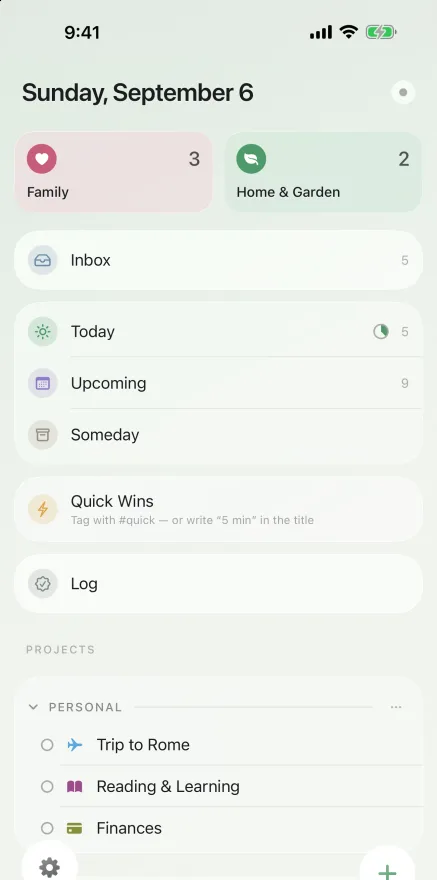
Everything lands in the Inbox first
No project to pick, no date, no thinking. Type it and move on, sort it later. A task you have to think about while writing it down is a task you don't write down.
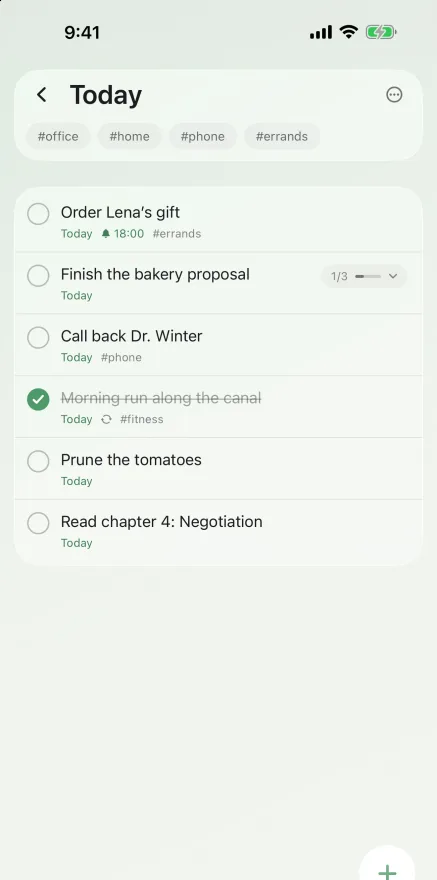
“Today” is a decision
It holds what you intend to do today — not everything that happens to be due. Whatever you keep for later gets Evening and moves into a pane of its own. When there is too much in it, Hobba asks once a day, quietly.
The plus is dragged
The one thing nobody guesses. Tapping adds a task at the end. Hold and drag adds it where you let go.
Four gestures, that's all
Hobba doesn't swipe. There are no hidden actions at the edges of a row that you only discover by triggering them by accident.
- The circle on the left completes a task; tapping the row opens it.
- Press and drag to reorder. Press and hold still opens the menu.
- Drag onto the bin to delete — see above.
- Pull down from the top to open search. There is no magnifying glass on purpose.
Finally: turn on iCloud
Settings → iCloud → Sync. After that your tasks are on iPhone, iPad, Mac and Watch — in your iCloud, not on a server of ours.
If after a few days you notice you are opening Hobba more often than necessary, carry on with Using Hobba without opening it.
Hobba is a task app for iPhone, iPad, Mac and Apple Watch — no account, no subscription, no tracking. On the App Store since 30 August 2026: one purchase, no monthly bill.
Download on the App Store